.png)


Unique Wrestling Analysis.

How To Use the Wrestling Cards Generator

When we go to the page on our site for the Wrestling Cards Generators, we'll first see a brief explanation of what this is. But just scroll down and below we'll find a grid of six wrestling promotion logos, like the image here:
If we click on the logo of the roster we'd like a Wrestler Card from, it will take us to the Wrestler Card Generator app for that promotion.
You might get a message "this app needs to wake up." If so, just click the "yes" button and then give it some time to unhibernate and come back to it.


But let's say we've clicked the ROH app and it successfully opened, we'll see a page like this:
To the left of the screen is the "View" menu.
We don't need that yet, so we can just get it out of our way....
...Hover over the "View" menu and a symbol like "<<" appears in the top right. Click that and the "View" menu goes away! Don't worry, the ">>" symbol will bring it back when we want to check out those other views later!


When we came to the generator, it automatically made a card for Jay Briscoe. This was not out of tribute, but just the way the drop-down menu is sorted. Click on the "Search a wrestler" menu to see all of our other options: the rest of the ROH roster sorted by # of matches
Now, let's say we wanted to see the Wrestler Card for someone else on the ROH roster besides Jay.
We could just scroll down the menu till we find their name.
But there's a LOT of names!
Simpler to delete out what's pre-set in the "Search a wrestler" field and start typing the first OR last name of the wrestler we're looking for and there you go!


And, there you have it: a career analytics card for the American Dragon's career in Ring of Honor. Scroll down – there's a LOT! But if we want to save our Wrestler Card, we don't need to scroll and take a bunch of screen shots – just use one of the buttons we see between the Card and the drop-down menu: "Download HTML" or "Generate PNG"
I've circled the "Download HTML" button in green ink. We select that button if we want to download some code that, when we open it later, will recreate just this Wrestler Card again in the web browser. But if we want an image file of our card, there are two options – if your browser is Chrome and you have or want to get the "Playwright" Chrome extension, you can just press the "Generate PNG" button (circled in red) and you'll download your file. But...

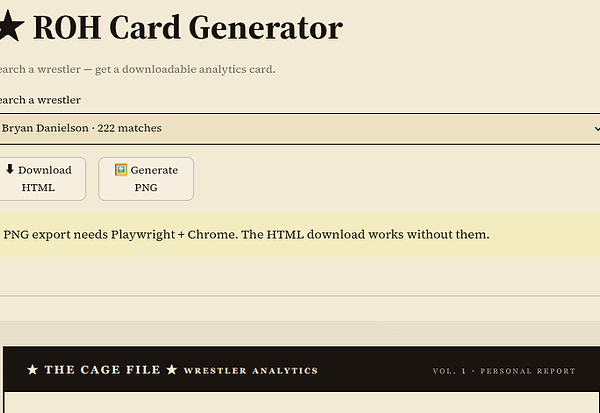
...But if you don't use the Chrome browser or don't have (or want to add) the Playwright Chrome extension, you'll get the error message we see in the image here.
But this isn't hard to get around, if you download the HTML, there are free HTML to image converters online.
This is the Wrestler Card for Bryan Danielson that I converted from HTML to PNG with a website called CloudConnect and it worked pretty smoothly!
Boy, that's LONG! There's a lot of stats there, but that's for Arul to explain.
Check out his introductory explainer to the Wrestler Cards themselves for all the details!


Meanwhile, let's finally take a look at those other Views. In the top left of your browser screen, we should see a symbol like ">>"
Click on this and the left menu comes back and we see a choice of three different views:
"Single card"
"Compare two"
"Leaderboards"
So let's start with "Compare two" View
Once we select this, the Card Generator app changes from one drop down menu to two, labeled "Wrestler A" and "Wrestler B"
Changing View clears the wrestler we had selected before, going to the default: the wrestlers with most and 2nd-most matches
Ironically, with ROH this gives us brother vs brother!


If we go back to Bryan Danielson, this then shows us the data on Bryan vs Mark. While the two men DID have three matches against each other, I think we can find a more interesting match-up
Let's backspace out Mark and start typing in the name of the director of 2000's Charlie's Angels and we will soon see Bryan's career nemesis...
And here we have it, the Wrestlers Card comparing the ROH careers of Bryan Danielson and Nigel McGuinness
The first small text section is about their matches against each other, specifically: the W/L record and the ratings those matches received
The rest shows overall metrics for each wrestler side-by-side with the winning metric color coded


Finally, go back to the "View" menu and we can check out the last remaining view: Leaderboard
Unlike the others, this view has no drop down menu, but several tabs
The default tab is "Best Workers" which shows the top 15 of the ROH roster, based on the average of the CAGEMATCH ratings for all their ROH matches
KENTA is #1, here, but has a LOT smaller sample size than #2 Danielson. 20 is the minimum matches for inclusion, or 5 promos...
Each tab gives you a different leaderboard of the top 15 (if there are that many, in promos not enough have been rated)
In my opinion, one of the most interesting tabs is the "Top Elevators" which ranks all the wrestlers on the roster base on how much they improve their opponent
ROH Ace Danielson in #5 in this stat, with KENTA, Low Ki and the Young Bucks beating him out
